
When the wall outlets go quiet, the first thing people miss is not always the biggest appliance. It is the phone that will not charge, the dark hallway, the silent router, the lukewarm leftovers, the fan that used to make sleep easier. Planning for small comforts during outages is not about pretending a battery can run everything; it is about choosing the few useful loads that keep a rough day civilized.
Home transfer-switch connections, inlet boxes, or any attempt to feed portable battery power into household circuits should be handled by a qualified electrician to meet local electrical codes and safety standards.
The short version
A portable power station earns its keep when it is assigned real jobs: light one room, keep communications alive, preserve food for longer, support essential medical-device planning, or let a workday continue. The best comfort plan starts with a short priority list, measured device loads, and a realistic recharge path. Capacity matters, but so do inverter losses, standby draw, weather, charging time, and whether the unit is light enough to move where the comfort actually happens.
Think of backup power as an energy budget, not a magic outlet. A battery that disappoints when asked to run a whole kitchen can feel excellent when it keeps the router, phones, task lights, and a laptop alive. That is the mental shift that separates useful backup from expensive guesswork.
The comforts that earn their watt-hours
Internet that keeps the room calm
A powered router does more than keep streaming alive. It lets people check outage updates, message family, keep a hotspot as a fallback, and make normal decisions without burning phone batteries. During a short outage, internet access can make the difference between everyone pacing around the house and everyone settling into a workable routine.
The key is to check the full chain: modem, router, mesh node if needed, and any fiber or cable network box that must stay powered. A single missing plug can break the whole setup. For battery planning, measure the combined draw rather than trusting labels on individual power adapters.
One good light beats five dim ones

Lighting is where small backup systems can feel bigger than they are. A single efficient lamp aimed at a kitchen table can turn a dark room into a command center for board games, charging phones, making sandwiches, or sorting cables. Headlamps are useful, but they get old fast when everyone is trying to relax.
Low-draw LED lanterns and USB lights are often better comfort per watt than running ceiling fixtures through a larger backup arrangement. Keep them in the same bin as charging cables so the first ten minutes of an outage do not become a flashlight scavenger hunt.
Coffee, tea, and the morning reset
Hot drinks are emotionally larger than their energy footprint suggests, but electric heat is demanding. A drip coffee maker, electric kettle, or hot plate can drain a portable station much faster than lights or electronics. That does not make morning coffee impossible; it means the setup needs intention.
One approach is to use the battery for grinding beans, charging devices, lighting, and the refrigerator plan, while a non-electric method handles boiling water. Another is to reserve a brief, measured burst of battery power for a small appliance and accept the trade-off. Comfort is personal, but watts are not sentimental.
Cold food without running the fridge nonstop
Refrigerators cycle. They do not pull the same load every minute, and their startup behavior matters more than a quick glance at the nameplate. A plug-in energy meter such as the P3 International P4400 Kill A Watt can help turn a vague fridge estimate into a daily consumption number you can actually plan around.
In a real outage, many people do better with a rotation plan than a nonstop plan: keep the fridge closed, run it during selected windows, and save the battery for the rest of the priority list. Food safety still depends on time, temperature, and how often the door opens, so use a refrigerator thermometer and common sense rather than runtime optimism.
A laptop workday that still feels professional
Mobile work changes the stakes. If your job can continue with a laptop, monitor, phone, and internet, backup power buys you options: finish a meeting, upload a file, or keep a camera battery ready. The most comfortable setup is usually not the biggest possible station; it is the one that sits near the desk, has the right outlets, and does not require cable gymnastics.
For a carryable station to compare against a workday kit, the Jackery Explorer 1000 v2 is one useful reference point because it sits in the portable power station category without drifting into whole-room backup expectations. Pairing a station with a high-output USB-C wall charger, such as the Anker PowerHouse 100W Charger, can also simplify normal-day charging before weather or travel complicates things.
Sleep support and medical-device caution
Fans, white-noise machines, heated bedding, and CPAP equipment change how a night feels when the grid is down. These are not all equal loads, and medical equipment deserves a stricter plan than comfort gear. Use the device manufacturer’s instructions, understand whether humidification or heated tubing changes power use, and avoid treating any portable station as a guaranteed medical backup.
If a device is health-critical, build redundancy beyond one battery: charged backups, alternate charging paths, and a plan for leaving if power conditions become unsafe. Portable power can help, but it should not be the only layer.
Turn the story into a battery plan
The simplest planning method is to write down the moments you want to protect, then translate each one into loads. Instead of starting with a station size, start with the scene: breakfast, bedtime, a four-hour work block, a fridge-cooling window, or an evening room with light and internet.
- Name the comfort. “Keep the router on” is clearer than “power electronics.”
- List every plug involved. A router plan may include a modem, mesh node, and network terminal.
- Measure or estimate conservatively. Real draw beats nameplate ratings; if you cannot measure, leave margin.
- Decide what gets turned off. A battery budget works because some loads wait their turn.
- Plan the recharge path. Wall charging before an outage, vehicle charging during travel, and solar in good conditions all have different limits.
The site’s Portable Power Station Runtime Finder is built around that kind of thinking: capacity, output, weight, solar input, expansion support, and other fields that matter once your devices stop being theoretical.
Three comfort setups that make sense
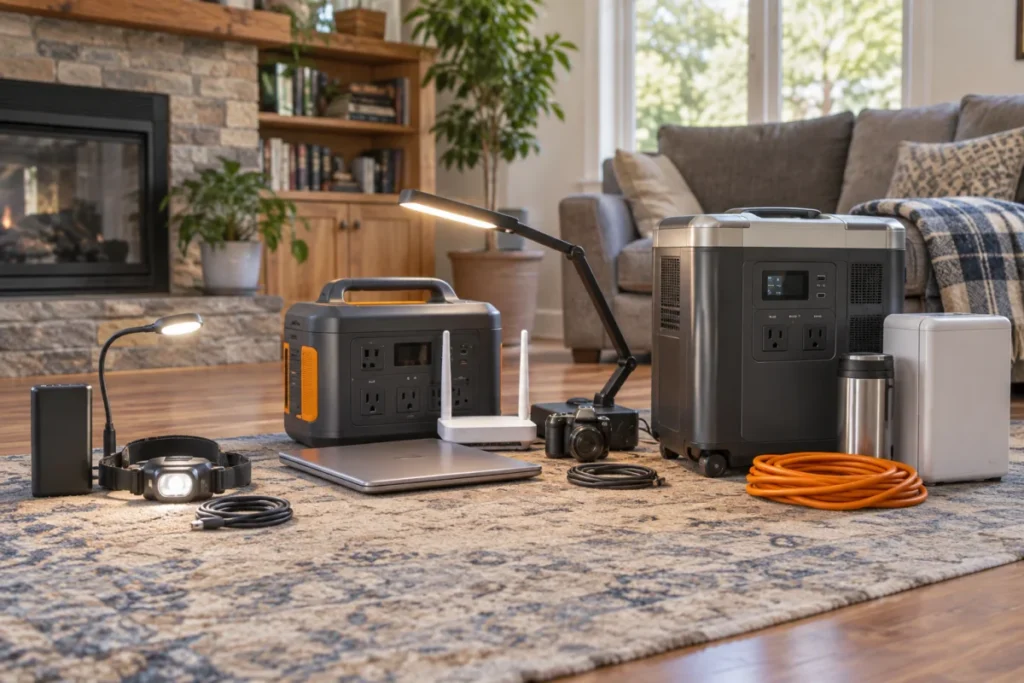
The pocket-and-lamp kit
This is the no-drama layer: power banks, USB lights, headlamps, short charging cables, and a small radio or weather-capable device if it fits your routine. It will not run a refrigerator, but it can keep the first night organized. Every larger backup plan should still have this layer because it works when the main station is recharging or in another room.
The desk-and-evening-room station
This setup is for routers, laptops, task lights, camera chargers, and small comfort devices. Portability matters here because the station may move from desk to living room to vehicle. Look at outlet layout, weight, noise expectations, and idle consumption as much as headline capacity.
The home-base battery
A home-base station is heavier, less casual to move, and better suited to fridge windows, multiple-device charging, longer internet support, and staged household routines. Larger entries such as the Goal Zero Yeti PRO 4000 are worth comparing when your priority list has grown beyond phones and a lamp. The trade-off is simple: more capability usually means more weight, more storage space, and a stronger need to plan charging before the outage starts.
Common planning mistakes
- Buying for the biggest appliance first. Start with the comfort moments you can realistically protect, then decide whether the refrigerator or cooking loads fit.
- Ignoring standby draw. Inverters and connected gear can use energy even when nothing exciting is happening.
- Counting solar as guaranteed. Portable panels are useful, but shade, clouds, angle, season, and setup time all matter.
- Forgetting cables. The right battery is frustrating if the USB-C cable, extension cord, or DC adapter is missing.
- Expecting one station to solve every outage. Sometimes two smaller layers provide better resilience than one large box doing everything.
Helpful questions
What comfort should I power first?
Start with communication and light. A charged phone, working internet connection if available, and one comfortable room make the rest of the plan easier to manage. After that, add food protection, work gear, sleep support, and any essential health-related devices in priority order.
Should I run appliances through AC or DC?
Use the connection the device is designed for, but understand the trade-off. AC outlets are flexible and familiar, while DC and USB-C can reduce conversion steps for compatible gear. Do not improvise cables or adapters for equipment that was not designed for them.
How much margin should I leave?
Leave more margin than the spreadsheet suggests. Battery capacity ratings, inverter losses, temperature, device cycling, and charging interruptions all affect real runtime. A plan that uses most of a station’s theoretical capacity on paper can feel tight in real life.
Practical takeaway
The best backup story is not dramatic. It is the lamp that turns on, the router that stays alive, the cold food that gets another careful window, the laptop that finishes the call, and the calm feeling that someone had a plan. Small comforts during outages are not luxuries when they help people make better decisions, rest better, and stay connected. Build around the moments that matter, measure what you can, and let the battery serve the routine instead of the other way around.